
What does a packing list app actually do?
Not what the name suggests. The list itself is the easy part; it is on this site too, for free. What a packing list app adds is that the list belongs to the whole group: everyone sees the same version, ticks off live, and each item says who brings it. That last part is the difference between a checklist and a shared packing list.
The second thing it adds is memory. A list you throw away after the trip, you rebuild next summer. A list that is kept gets better every time.
Six things to check
With one person these barely matter. As soon as two or more people pack, they decide whether the app is still in use after one trip.
- Is the list genuinely shared? A screenshot in the group chat is not a shared list. Check whether everyone can tick off in the same list and see at once what is already packed. Otherwise one person packs what another already did.
- Can you record who brings each item? This is the big one. A list without an owner per item does not solve double packing. Also check whether an item can belong to a couple or to the whole group, not only to one person.
- Does it work offline? You open the packing list precisely at the campsite, on the plane or in the mountains. An app that fetches the list live leaves you stranded exactly there.
- Does the list survive to next time? Templates, or a copy of an old trip. If every trip starts from scratch, you will stop using it after two holidays.
- Can everyone join for free, on any phone? A packing list app the rest of the family has to pay for, or that only runs on iPhone, will not be installed by half of them. And then you are back to the screenshot.
- Is the rest of the trip in there too? Who brings what, who paid for what and where the confirmations live are all about the same trip. Two separate apps means half the group uses one of them.
Paper, notes or a packing list app?
An honest comparison. Travelling alone, paper wins on simplicity. It only strains once more people are packing.
| Paper | Notes app | Packing list app | |
|---|---|---|---|
| Everyone sees the same list | No | Only if you share it | Yes, always current |
| Who brings what | Written in the margin | Tracked by hand | Recorded per item |
| Ticking off live, together | No | Sometimes, with a delay | Yes |
| Offline at the campsite | Yes | Usually | Yes |
| Reuse for the next trip | Overwrite | Copy and clean up | Template or copy |
| Costs and plans alongside | No | Separate note | Built in |
| Barrier for the others | None | Low | Install an app |
What PAKT does
PAKT is a packing list app for families and groups. You create the trip, invite everyone, and the packing list is there straight away, based on one of seven templates or your own list from last time.
For each item you record who brings it: one person, a couple or the whole group. What is packed shows up for everyone at once, and a category folds away once everything in it is ticked off. Everything works offline and the list is kept. Joining is free, on iPhone and Android.
Download PAKT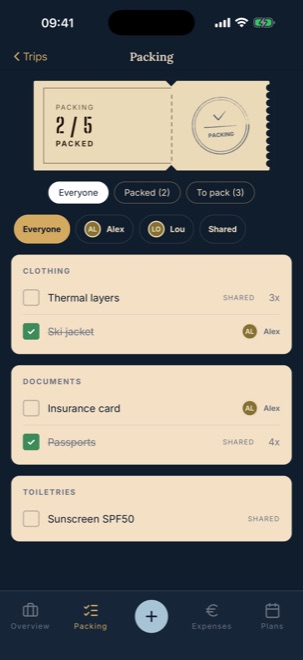
What PAKT does not do
PAKT does not weigh your suitcase and does not scan barcodes. There is no shop behind it and no links to products: it is your list, not a sales channel.
It is also not a standalone packing list app: the list belongs to a trip, with the plans and the costs next to it. If all you want is a list to print, those are below, free and without an app.
Beyond that, no tracking and no ads. The core features are free; PAKT Pro is a one-off purchase, not a subscription, adding custom templates and unlimited history among other things.
Just want the list?
The packing lists on this site are free, no app needed. Tick them off on your phone or print them.
Never three hairdryers and no adapter again
Create your trip in PAKT, invite your family or group and tick off together. Each item says who brings it. The core features are free, on iPhone and Android.
Download PAKT